
Wing or foil design tutorial: going further (incidence, downwash, thickness)
This wing or foil design tutorial (going further) details how to design a wing or a foil with Heliciel when you want to control the incidence, the twist and the thickness distribution. These options were left aside in the first tutorial, building a wing or foil (getting started). A page of general notes on wings recalls the principles worth knowing: wings, hydrofoils and sails.
On this page:
- How the performance of a wing is calculated
- Choosing the incidence and the twist
- Effective angle and downwash angle
- Forcing the incidence of an element
- Thickness distribution and airfoil shapes
1 : How the performance of a wing is calculated
To compute wing performance, Heliciel uses Prandtl's lifting-line theory. You can design your wing without mastering the mathematical foundations of this method: that is the whole point of Heliciel. The notions of induced velocities and angles it introduces nevertheless help in understanding the results. They are detailed on the page on Prandtl's lifting-line theory.
The first tutorial, building a wing or foil (getting started), shows how to use Heliciel to study a wing or a hydrofoil against a set of requirements. Controlling incidences and airfoil shapes then gives you better command of performance and strength.
2 : Choosing the incidence and the twist of a wing
Heliciel can force the incidence of a selected element. The video shows this setting.
If you let Heliciel choose the angle of attack of your wing automatically, the software retains by default the theoretical maximum lift-to-drag angle. This angle is set by the optimum Cl/Cd ratio of the airfoil (Cz/Cx in French). For a wing made of different airfoils, it can vary from one airfoil to another.
3 : Effective angle and downwash angle
We must distinguish 2D performance from the real (3D) performance of the wing, which undergoes the velocities induced by the vortices that lift generates. When Heliciel applies a "geometric" angle of attack (the pitch angle), the effective angle of attack the airfoil actually sees is modified by the induced velocity. The deflection angle it produces is called the downwash. The page on downwash and Prandtl's lifting-line theory covers this phenomenon in detail.
Here is the variation of the effective angle generated by the induced velocity at the airfoil of an element:
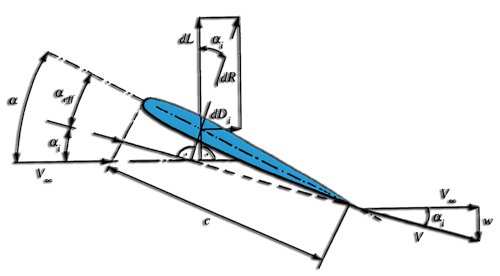
- The velocity V∞ is the upstream velocity.
- The velocity w is the velocity induced by the vortices. It points downward: it is therefore negative.
- The angle α is the geometric angle of attack.
- The angle αi is the induced angle of attack.
- The angle αeff is the effective angle of attack, actually seen by the airfoil.
In this example, we let Heliciel apply the angle of attack corresponding to the theoretical maximum lift-to-drag ratio, computed from the 2D performance in the airfoil database. Let us look at the diagram of the airfoil at the root of element 3 (click the element, then right-click the airfoil diagram in the 3D window):
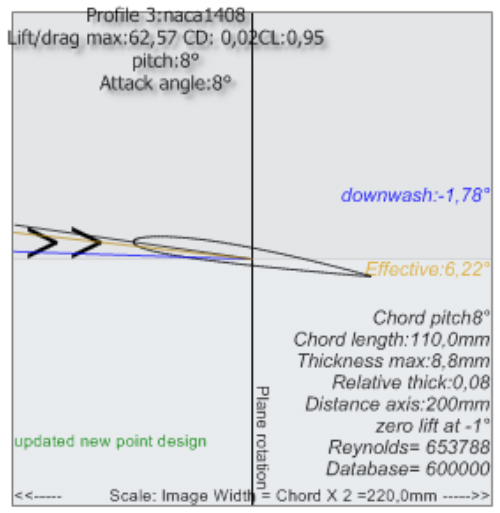
Airfoil of element 3: pitch and angle of attack 8°, downwash -1.78°, effective angle 6.22°.
For a wing, the angle of attack and the pitch angle are identical (here 8°). The diagram distinguishes the effective angle (6.22°) and the downwash angle (-1.78°). The latter represents the deflection caused by the induced velocities: the effective angle actually seen by the airfoil is therefore 8° − 1.78° = 6.22°. This is the angle used to compute the performance of our wing.
4 : Forcing the angle of attack of a wing element
We can change the geometric angle of attack (pitch) of the selected element, either through the Parameters › Incidence forcing menu or by selecting the element in the 3D model and opening its menu with a right click. The video shows the forcing of the incidence of a selected element:
By applying a forced angle of 5° for this airfoil, we obtain an effective angle of 4.6°.
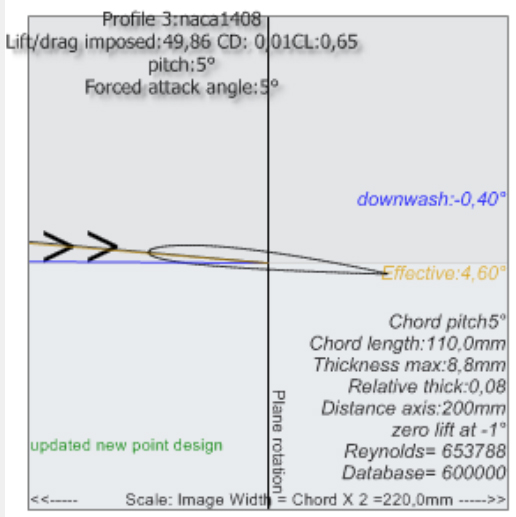
Angle of attack forced to 5°: the downwash falls to -0.40° and the effective angle to 4.60°.
The overall performance changes as well, and the overall lift-to-drag ratio of the wing has dropped. That is logical: we applied an angle other than the maximum lift-to-drag angle, and this shows in the 3D performance. That is why Heliciel chooses the optimum maximum lift-to-drag angle by default.
5 : Thickness distribution and airfoil shapes of a wing
To define the thickness of the wing, you have two options.
- You can force the airfoil of an element by choosing it by hand in the airfoil database, for the selected element. This option is detailed on the page on choosing a blade airfoil.
- You can set the thickness distribution along the wing by selecting the profile law by thickness. The geometry tab then lets you enter a required thickness at the blade root and at the blade tip, and a slider sets the thickness distribution between the root and the tip of the wing. This option is detailed on the page on blade thickness distribution.
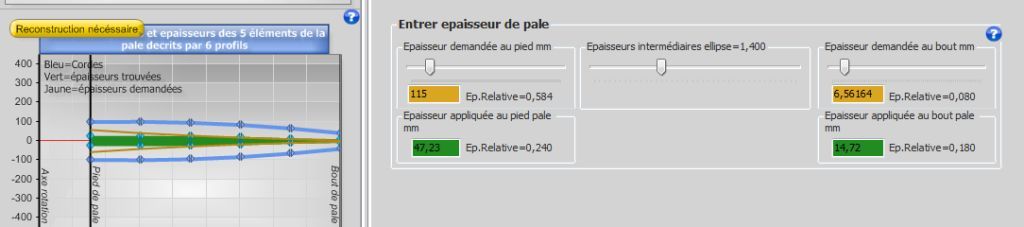
The thicknesses requested at the blade root and tip, and those the software applies.
To go further, we can return to the introductory tutorial on wing or foil design, or study the effect of wing aspect ratio on performance.
 Global site map
 Mecaflux
 Tutorials Mecaflux Pro3D
 Tutorials Heliciel
 Tutorials Heliciel PRO CFD
 Mecaflux Store
 Compare software functions
 Quotes, Orders, Payment Methods
 project technical studies